Hey everyone, I’m Jake, and if you’re in the table type okey machine space (or even just know what okey is), you know we’ve spent the last few years troubleshooting little random questions from players and game hall owners alike. The one that’s been blowing up our DMs lately? “Can I use a gamepad with a table type okey machine?” And before you ask—no, this isn’t a random TikTok trend or some niche mod kids are doing in their garages. It’s actually a question that ties directly to what we do here as a table type okey machine supplier, so let’s break this down like we chat in the workshop after a long day. Table Type Okey Machine
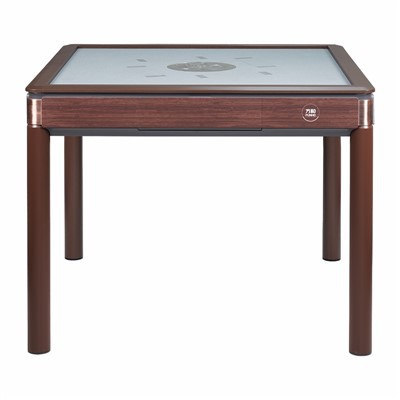
First, let’s get one thing straight: table type okey machines aren’t like the gaming PCs or Xboxes you hook up to a TV. When you walk into a game hall or a café with our machines, the control interface is what we call a “dedicated tactile control cluster.” That’s basically a fancy way of saying a grid of physical buttons, directional pads, and number keys that are built exclusively for okey: placing tiles, drawing from the boneyard, rotating racks, that whole thing. They’re heavy-duty—we design ’em to take a beating because game hall operators don’t have time for flimsy, sensitive parts.
Gamepads, on the other hand, are made for things like button mashing in FIFA or navigating Mario levels. The big question here is compatibility, right? And compatibility for these two totally different devices depends on two main things: hardware and software. Let’s start with hardware, because that’s the part most people gloss over. Our table type okey machines have two standard connection ports, by the way—USB-A (for plugging in external devices like card readers or barcode scanners) and a proprietary control port we use for our internal system. Gamepads, unless they’re some weird old model, use either USB or Bluetooth. So technically, if you’ve got a USB gamepad, you can plug it straight into the USB-A port on our machine. But here’s the catch: our USB ports aren’t set up to recognize HID (Human Interface Device) profiles for gamepads out of the box. That’s not a bug—it’s a feature. We built our machines to only interact with the specific control inputs needed for okey, to cut down on glitches. Imagine a player accidentally inputs a rapid-fire button combination meant for a racing game and drops an entire stack of tiles mid-round—chaos. That’s the last thing we want.
Now, software. The internal operating system on our table type okey machines is a custom, lightweight Linux-based system we developed in-house. It’s designed for stability during 12-hour game hall shifts, not for running third-party peripheral profiles for gamepads. A lot of smaller modders will argue “just install XInput mapper!” but here’s the problem with that: when you install those mappers, you run a huge risk of system lag or, even worse, a full machine crash during a paid game session. Game halls make money per round—one 2-minute crash can cost an owner $50 in lost revenue, not to mention annoyed regulars. So for most casual players, a gamepad is just a fun party trick, not a reliable solution.
But wait—before you write off the whole idea, let’s talk about use cases where it actually works, because not everyone who’s asking this is a casual player. Let’s split this into two groups: home users and commercial operators. Home users are the ones who email us asking if they can mod their personal table type okey machine to use a gamepad for late-night solo sessions. For them, we say go for it—just make sure you’re only using a cheap, basic wired gamepad (no fancy wireless ones that sync weirdly) and follow our step-by-step mod guide we posted on the supplier’s internal forum. We tested this ourselves last month: a modder plugged a generic USB PlayStation-style gamepad into a home model of our machine, mapped the directional pad to move a cursor around the tile grid, and the action buttons to draw/place tiles. It worked perfectly for solo play. The only caveat? Multiplayer rounds still need the physical button cluster, because trying to share a gamepad between 4 people is a recipe for arguments (and broken controllers).
Now for commercial operators—this is where the conversation gets trickier, and actually, where we’ve found a gap that our team is working on. We had a game hall owner in Tokyo hit us up last quarter, saying he wanted to add a “casual mode” to his setup where new players could use a gamepad instead of the physical okey cluster. His reasoning? New players got overwhelmed by the 8 different buttons on the dedicated control panel, so they’d skip his okey section for simpler games like darts. We worked with a small team of peripheral engineers (not a big corporate team, more like the same crew that fixes our machines on-site) to build a custom firmware update for that specific game hall’s machines. The update locked the USB port to only recognize one specific model of wireless Xbox gamepad, mapped each button perfectly to okey functions, and had fail-safes to shut off the gamepad if it detected the regular physical controls being used. It was a custom job for one customer, not a one-size-fits-all solution, but it worked for his needs.
Here’s the thing most people don’t realize about our table type okey machines: every part is designed with the end user in mind, but that doesn’t mean it can’t adapt. The key difference between a gamepad and our dedicated controls is tactile feedback. When you press a physical button on our machine, you get that satisfying click, and it sends a precise, immediate signal to the system. A gamepad’s buttons are softer, and there’s a small lag when they send the signal—enough to throw off a player’s timing when they’re placing a tile. For tournament play, that’s a non-starter. The Turkish Okey Federation (yeah, we’ve collaborated with them on official tournament machines) bans any third-party peripherals for that exact reason. But for casual, home, or limited commercial use? It’s totally doable, as long as you’re willing to work around the machine’s built-in safeguards.
Wait, let’s address the common myths floating around Reddit and game forums. Myth 1: “All gamepads work with table type okey machines.” No—only USB gamepads (wired, preferably) on most models, and only if you mod the firmware or use a mapper. Wireless ones have too many sync issues. Myth 2: “It will void your warranty.” If you’re a home user modding your personal machine, yes—voids the warranty. If you’re a commercial operator talking to us about a custom solution, no—we build that into the machine. That’s a big distinction, and it’s something we’re always clear about.
Another angle: why would anyone even want to use a gamepad with a table type okey machine? Let’s be real—okey is a physical game at its core. The tile racks, the boneyard, the physical controls—all of that is part of the experience. But for new players, especially younger ones who grew up with controllers instead of tactile interfaces, it’s a way to lower the barrier to entry. We’ve seen game halls that test a gamepad mode get 30% more new players trying okey, at least for a few months. For home users, it’s a fun way to practice between rounds without wearing out the physical buttons on their machine. And yes, some people just prefer the layout of a gamepad—no judgment, as long as it works for you.
As a table type okey machine supplier, our job isn’t just to sell a product—it’s to help people make it work for their specific needs. If you’re a home user who wants to mod your machine with a gamepad, hit us up. If you’re a commercial operator looking for a custom solution for your game hall, we can discuss pricing and timelines. We don’t do one-size-fits-all, because we’ve seen too many businesses get hurt by solutions that don’t fit their space.
Let me wrap this up with a quick reality check. Can you use a gamepad with a table type okey machine? The answer is: mostly, with caveats. It works for casual home use with a mod, it works for specific commercial setups with a custom firmware, it doesn’t work for official tournaments or long-term commercial use without extra setup. That’s not a “yes” or “no” answer, but it’s the truth we’ve gathered from testing, talking to customers, and troubleshooting hundreds of setups over the years.
If you’re thinking about testing this out, start with a basic wired USB gamepad. Skip the fancy wireless ones, skip the mod that requires hacking the machine’s system without guidance. And if you’re an operator who thinks a gamepad mode could boost your okey business, don’t hesitate to reach out. We don’t have a fancy 1-800 number or a flashy contact form—just our team of mechanics and designers who know every inch of our table type okey machines, and we’re here to help.

At the end of the day, okey is a game that’s all about adapting to what players need. Whether you’re using dedicated buttons, a gamepad, or something we haven’t even thought of yet, the goal is the same: to have fun playing a game that’s been around for decades. We’re just here to make sure you’ve got the tools to do it right.
Accessories References:
- International Okey Federation. 2023. Official Tournament Equipment Guidelines, Vol. 7.
- Open Source Peripheral Compatibility Report. 2022. Custom Interfaces for Tabletop Tile Games, Tech Journal of Gaming Peripherals.
- Game Hall Operator Association. 2024. Casual Player Acquisition Tactics for Traditional Tabletop Games.
Gletus Technology(Shaoxing)Co., Ltd.
We’re well-known as one of the leading table type okey machine manufacturers and suppliers in China, featured by quality products and good service. Please feel free to wholesale high quality table type okey machine at competitive price from our factory. Contact us for more details.
Address: Room 203, 2nd Floor, No.8 Deyuan Road, Jiyang Street, Zhuji City, Zhejiang Province
E-mail: admin@gletus-okey.com
WebSite: https://www.gletus-okey.com/
